


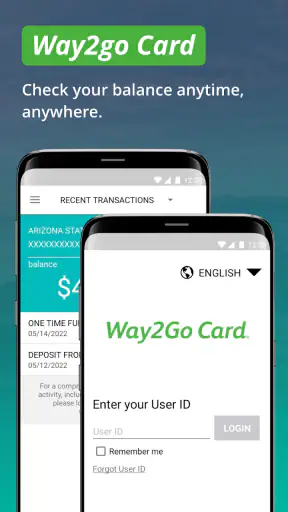
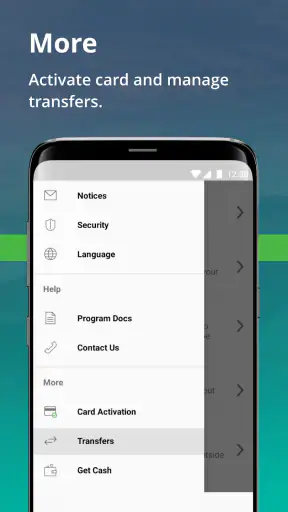
Managing a payment card is usually less interesting than using one, but that is exactly where Go Program Way2Go Card earns its place. This free finance app is built for people who use a Way2Go Card and want a quicker view of their available balance and recent transaction activity without relying on a desktop browser or calling for routine information. I found its purpose refreshingly narrow: it is not trying to become a complete budgeting suite, a bank replacement, or an investment dashboard. It focuses on helping cardholders answer a simple question before they spend: “How much can I use right now?”
That narrow focus is both its strongest quality and its main limitation. If your everyday money is connected to a Way2Go Card, the app can make checking your account feel more manageable. If you want detailed spending categories, bill planning, savings targets, or broad support for several financial accounts, you will probably find it too specialized. My overall view is positive for the intended audience, but only when expectations are set correctly.
What using the Way2Go Card app is really like
Go Program Way2Go Card comes from Conduent Incorporated and has been available since August 14, 2015. It is listed for Everyone, costs nothing to download, and has reached over a million installs. Those figures suggest that this is an established utility rather than a new experiment, while the average rating of 3.5 from roughly 58 thousand ratings shows a more mixed experience than the install count alone might imply.
I would describe the app as a companion to the card, not as a general-purpose personal finance tool. Its store summary points to balance and transaction monitoring, and that accurately captures the practical reason to open it. The useful value is not in exploring a large collection of financial tools; it is in getting a direct look at card activity when you need to make a decision.
For example, imagine receiving a payment onto the card and then needing groceries before the day is over. Instead of guessing from an old receipt or assuming the last balance you remember is still accurate, you can open the app and check the account view before heading to the checkout. That small step can prevent an awkward declined transaction. The same habit helps when you have made several purchases and want to see whether they have appeared in the transaction activity.
The app works best as a confidence check before spending. That is a modest role, but it is a valuable one for anyone who depends on this particular card and does not want to treat their balance as a mystery.
Balance checking is more useful than it sounds
A balance screen may seem too basic to deserve a dedicated app, yet payment-card users often need exactly this information at inconvenient moments. The important distinction is between remembering what you had and seeing the account information available through the service. When money is moving in and out, memory is not a reliable accounting system.
I especially like the idea of checking the balance before a purchase that is close to your expected limit. This is more practical than using a separate notes app or trying to reconstruct spending from paper receipts. It also gives you a simple routine: open the app, review the available amount, look at recent activity, and then decide whether to use the card.
That workflow is useful for people who receive funds on the Way2Go Card and use it for ordinary expenses. It is less useful for someone who wants a complete picture of household finances, because a card-focused balance does not automatically replace a full budget. The app can tell you about the card account, but it should not be treated as a complete measure of your financial health.
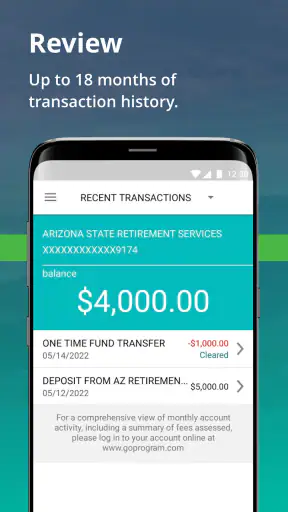
Transaction activity can help with basic checking
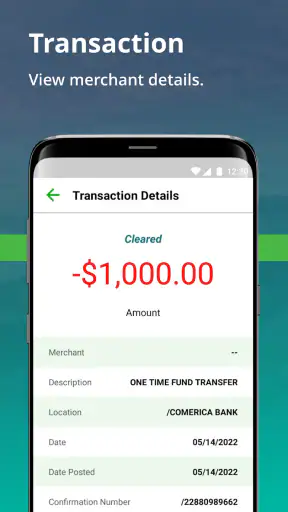
Recent transactions are valuable for more than curiosity. They can help you remember where the card was used, notice whether a recent purchase has appeared, and compare the account activity with your receipts. I would make a habit of checking after a busy shopping trip rather than waiting until the balance looks surprising.
There is also a useful troubleshooting habit here. If the balance seems different from what you expected, look through the transaction activity before assuming the app or card is wrong. A purchase you forgot, a recent payment, or activity you do not recognize can explain the difference. The app does not turn that review into a full fraud-management process, but it gives you a practical first place to inspect what happened.
My advice is to use the transaction view as a checkpoint, not as a replacement for keeping receipts. A receipt still gives you the merchant and purchase details at the moment of sale, while the app gives you an account-level view afterward. Keeping both perspectives makes it easier to spot mistakes and avoid relying on a single source of memory.
Where this app fits among financial alternatives
The usual alternatives are a web account, a phone call, or a general banking and budgeting app. Go Program Way2Go Card has an advantage over a browser when you only need a quick account check on a phone. It keeps the task centered on the Way2Go Card rather than surrounding it with unrelated financial products.
A general banking app is a better choice when you need several accounts in one place, transfers between institutions, spending analysis, or a wider view of your finances. A budgeting app is stronger for categories, monthly planning, and long-term goals. A browser may be preferable when you are already working on a computer or need a broader account-management session. The Way2Go Card app wins when the question is narrow and immediate: what is available on this card, and what activity has recently taken place?
That comparison also explains why some users may rate it less enthusiastically. People often expect any finance app to provide a complete financial command center. This one is not designed around that expectation. Its value depends heavily on whether your financial life is already tied to the specific card it supports.
Small habits that make it more dependable in daily life
I would use three simple habits with this app. First, check the balance before a purchase that matters rather than after a transaction fails. Second, review recent activity after several purchases so that your memory does not become the only record. Third, compare the app with your receipts when the figures do not match what you expected. These habits sound ordinary, but they turn a passive balance display into a useful money-management routine.
Another practical tip is to avoid treating the displayed balance as permission to spend every available cent immediately. A balance check tells you what the card account shows; it does not account for cash expenses, upcoming obligations, or the rest of your household budget. I see the app as a guardrail against card-account surprises, not as a substitute for planning.
If you share financial responsibilities with someone else, the app may also be useful as a quick reference before discussing the card account. Instead of relying on an old message or an estimate, you can check the current activity first. However, I would still avoid sharing login details casually. A finance app deserves the same care as any other account that displays sensitive money information.
The friction I would want new users to understand
The biggest weakness is the app’s limited scope. It does not appear to be the right destination for someone hoping to organize every part of their finances. The Way2Go Card connection is the point, so users without that card have little reason to install it. Even cardholders may eventually want another tool if their needs grow beyond balance and transaction monitoring.
The mixed average rating is worth taking seriously without treating it as a final verdict. A focused account app can be frustrating when a user expects broader controls, when an account view does not answer a more complicated question, or when routine checking is interrupted by an issue outside the app itself. I would not judge it by the standards of a full bank app because that would be an unfair comparison, but I also would not ignore the possibility that a narrow tool may feel inadequate for more demanding users.
There is a mental limitation as well. Because the app makes card information easy to view, it may encourage frequent checking without improving the underlying spending plan. Opening it repeatedly will not create a budget or solve an income problem. Its best contribution is clarity at the moment you need card information, not long-term financial coaching.
For that reason, I would skip it if you want automated categorization, detailed charts, multiple-account aggregation, savings goals, or a broader financial overview. A dedicated budgeting service or your main bank’s application will be a better match for those jobs. I would also skip it if you do not use a Way2Go Card; the app’s specialization is not an advantage in that situation.
Who should install it
The clearest audience is a Way2Go Cardholder who regularly checks available funds from a phone. It is particularly suitable for someone who wants a straightforward way to review card activity before shopping, after receiving funds, or when a balance looks different from memory. The free price removes the usual barrier to trying a focused utility, and the Everyone content rating makes its intended audience broad.
I would recommend it to a person who values quick confirmation over a crowded feature set. If your main concern is avoiding an unexpected decline or checking whether a purchase has appeared, the app is aligned with that need. It can also suit users who are less comfortable navigating desktop account pages and prefer a phone-based routine.
I would be more cautious for financially organized users who already have a central banking app and want every account, card, and goal in one dashboard. Installing another app can create extra checking rather than better organization. In that case, the Way2Go Card app is worthwhile only if its direct card view is more convenient than the alternative you already use.
Version, maturity, and what to expect
The current version is 3.3.5 and requires operating system version 10 or later. That requirement matters before downloading: a compatible phone is necessary for the app to be a realistic option, especially if you are using an older device. I would check the operating-system requirement first rather than assuming every Android or iOS phone can run it.
The app’s long availability and large install base make it feel like a mature companion product, but maturity does not mean it will satisfy every account-management need. I would approach updates with a practical mindset: install the current version, test the balance and activity views, and decide whether the workflow is reliable enough for your routine. The most important test is not how many screens it has; it is whether you can reach the information you need without confusion.
Before depending on it for an urgent purchase, I would open it at home and become familiar with the account view. That gives you a chance to confirm that your card information is accessible and that the transaction history is understandable. It is better to establish that routine before you are standing in a checkout line than to make the first attempt under pressure.
My verdict for everyday card management
Go Program Way2Go Card is a focused finance app with a clear job: helping Way2Go Card users monitor their available balance and transaction activity. In my experience, that focus is a strength when you need quick, card-specific information and a weakness when you expect a complete financial toolkit.
I recommend it to eligible cardholders who want a convenient mobile checkpoint before spending and a simple way to review recent activity. I would not recommend it as a budgeting replacement, a multi-account dashboard, or a general banking solution. The most honest way to view it is as a practical companion to one card, not as the center of your entire financial life.
For the right user, that is enough. A reliable balance check can prevent avoidable surprises, and a transaction view can make everyday card use easier to follow. Just keep the boundaries in mind: use the app for card awareness, keep receipts and broader budgeting habits elsewhere, and choose a more comprehensive alternative when your financial questions extend beyond this account.


